|
|
Bulletin of Applied Computing and Information Technology |
 |
 |
 |
 |
 |
|
Off-Peak Distributed Computing |
|
02:03 |
|||
|
Mark Caukill Caukill, M. (2004, November), Off-Peak Distributed Computing. Bulletin of Applied Computing and Information Technology Vol. 2, Issue 3. ISSN 1176-4120. Retrieved from ABSTRACTDid you ever wonder what happens to the computers at work once everyone goes home? Not much – except for a few individuals helping to look for extraterrestrial signals! Ever think about what a waste it is to have all those computers doing nothing? Working together, these PCs can make a very powerful computer – potentially a super computer. The processing capability can be accomplished by distributed computing: it involves multiple computers across a network, and each computer (or node) has a role in solving computationally intensive problems. There is a considerable potential in exploiting computers during the time when they are not in use, i.e. to earn an income through the selling of computing power, in partnerships with researchers or industry. Distributed computing is not new to academia but it is not common to use academia’s core business computing power by industry, bringing a profit to the education institution. This paper will explain the basics of distributed computing, will show the initial aim of the project undertaken ay UCOL, will discuss what has been successful and not so successful, and will give directions for further work. KeywordsDistributed computing, grid computing, cluster computing, off-peak computing, commercial viability. 1. BASICS OF DISTRIBUTED COMPUTINGTrying to delineate a single definition of distributed computing is akin to asking how long the proverbial string is. If one does a Google™ (www.google.com) search using keywords of “define: Distributed Computing”, at least two pages of descriptions result – none of which exactly agree with each other. Add into the mix other labels like: cluster computing, grid computing, parallel computing, and the definitions become even more varied and contrary. It comes down to who is formulating the definition, their perspective on the subject and how detailed or pedantic they choose to be for their target audience. This section on the basics of distributed computing is a melange of definitions put together as the author understands the subject. It is not, nor does it try to be a definitive, precise summary, but a viewpoint from which others may become familiar with a rather complex and daunting subject. Simplistically, distributed computing can be characterised as a “compute task” that is spread amongst multiple computers within a network. Within this loose framework there is a set of jobs and devices that need identifying. Generally, a management server, or a master node, acts to distribute the necessary raw data out to the nodes on the network. It may also act as a centralised storage device for both raw data and ‘solution’ data. So the task puzzle is broken up and sent out to the nodes where the application processes the data and the computed solution data is sent back. A depiction of this process can be seen in Figure 1.
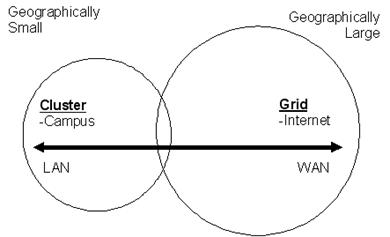
The next step in understanding distributed computing is to consider what is effectively the geographic relationship between the two distinctly different types of distributed approaches: grid computing and cluster computing. Grid Computing is distributed computing at a typically large geographic scale, linking a number of clusters over a telecommunications infrastructure. In some cases this is the Internet but more often than not is over a dedicated long distance network (WAN). At the campus sized, Local Area Network (LAN) end of the scale, distributed computing tends to be called "clustercComputing"; Figure 2 gives an overview.
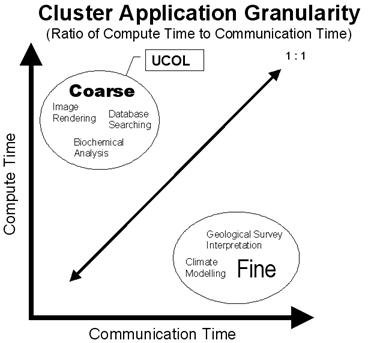
As the project this paper is about focuses on clusters, they will be considered in more detail. Again, in a ‘one-dimensional’ view of the issue, clusters come in two flavours: purpose built clusters and desktop clusters. Purpose built clusters are just that – built for the sole purpose of creating a powerful compute platform; in many cases, for a specific task. A purpose built cluster will generally have a fast, high bandwidth interconnect for efficient movement of data. Each node also tends to be homogeneous in terms of hardware configuration and operating system, and have a large amount of memory to keep I/O operations at a minimum. Desktop clusters are where a number of existing desktop computers on a LAN infrastructure, are used together to perform a compute task. In this format, a cluster is often working on the compute task using otherwise unused processor cycles (called ‘cycle scavenging). The business environment that a desktop cluster exists within, means that the nodes are heterogeneous, varying greatly in hardware configurations and operating systems. The network that these desktops are connected with is not an optimum interconnect for distributed computing, as it has most likely been built to support a business model. It is now appropriate to consider the types of compute tasks that are suitable to run on the various distributed platforms. One does not normally build a cluster and then search for an application to run on it, as the cluster cannot be optimally suited to every application. In a purpose built cluster, the compute task decides what algorithm is written and the specific format of hardware. Unfortunately, for a desktop style cluster, this is a luxury that is not available. The compute tasks must be chosen to fit the existing system within the limitations already present. This includes operating system or systems (which will primarily influence the algorithm used), memory, network interconnect, etc. The cluster management software is the only real choice for this type of system. The granularity of a compute task will determine which type of distributed system should be used for the purpose. Granularity is the ratio of compute time to communication time (Intel Corporation, 2002, p. 7). If the compute time to communication time ratio is high, then the task is considered to be a coarse grained application. These applications spend more time computing than communicating and in this situation one can get away with an inefficient (i.e.: slow business focussed) network interconnectivity. Where the ratio is low, the task is a fine grained application. Highly optimised, fast, wide bandwidth network interconnectivity is necessary in this situation as the compute task algorithm spends much of its time communicating with other nodes in the cluster. Examples of fine grained applications are climate modelling, and virtual nuclear weapons testing. Any application where the interaction of the parts plays an important role in the outcome is effectively fine grained. In the coarse grained area are jobs that can be broken down into parts that are only a smaller representation of the whole. Examples include image rendering and data-mining. A graphical representation of granularity can be seen in Figure 3.
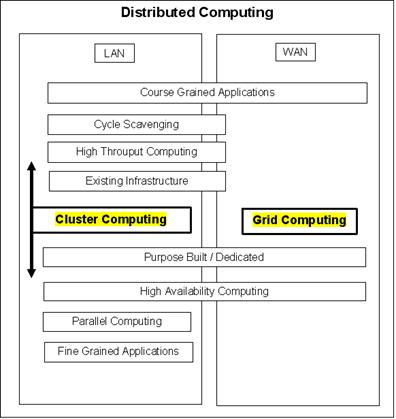
Figure 4 summarises the preceding abridged discussion of distributed computing. The author developed this generic picture in an attempt to show the interrelationship of the various definitions relationships between the various issues discussed, omitting some concepts for the sake of clarity.
2. THE INITIAL AIM OF THE PROJECTIt was anticipated that the project would be in three stages: research and analysis, proof of concept, and implementation. 2.1 Research and AnalysisSeveral factors must be addressed at this initial stage.
2.2 Proof of CnceptThis stage should, include a small-scale trial (or multiple simultaneous trials) if the outcomes of the research and analysis indicate that the project is feasible. 2.3 ImplementationThis stage includes full implementation, should stages 1 and 2 be successful. This would most likely be implemented on a rolling basis to avoid project difficulties, should they arise, getting ‘out of hand.’ From the outset it was intended for any cluster within UCOL to only operate initially during the non-core business hours; approximately 10pm to 7am each night. The project was effectively split into two areas of development: the Apple Computer Macintosh computers within the multimedia environment as one cluster, and the x86 computers across the rest of the campus as a second, larger cluster. The Mac cluster (Renderfarm) was to be treated as a multimedia based cluster, nominally for rendering images and movies. There was no expectation of income from this cluster per se; the intention was to establish a relationship with players in the multimedia industry. This relationship would be potentially beneficial to UCOL as it would provide an important link with industry and would facilitate guest speakers, student scholarships, and other similar involvements. The advantage for the cluster client would be in the use of the computing power without the associated capital and maintenance costs. The larger x86 based cluster is considered to be a bigger technical and business challenge, with the potential for reasonable financial returns. A multimedia approach was initially taken with this computer base but this has since turned towards more of a ‘technical’ problem solving focus such as biochemical analysis. This is where the author believes the cluster’s best chances of success are. 3. PROJECT SUCCESSES AND DISAPPOINTMENTSIgnorance is sometimes a wonderful thing. When one does not know what cannot be done, the possibilities are limitless. It can also lead to overly grandiose expectations! This has been the case with this project. To date barriers have outnumbered bridges. 3.1 The Mac RenderfarmOver a period of months during 2003 and 2004, a conversation was held with Rising Sun Pictures (RSP) (www.rsp.com.au) in Australia. They are a visual effects vendor credited with, amongst other notable achievements, the shuttle landing sequence in the movie “The Core” (Paramount Pictures, 2002). RSP choose not to make use of the Mac Renderfarm for the reasons discussed in the following paragraphs. This combination of factors was specific the same reasons might make the idea unlikely be successful with other multimedia/visual effects companies. Render licenses for 3rd party software are extremely expensive. Making them work on a remote network would be expensive and demanding for both 3D and 2D rendering. Essentially every processor used for rendering would require the purchase of a license for software. Low cost packages considered were the Lightwave renderer (http://www.newtek.com), and the 3DSMax native renderer (http://www.discreet.com). Serious’ commercial software costs around $2k-$5k per processor – see for example, Renderman (https://renderman.pixar.com), Mental Ray (http://www.mentalimages.com), Shake Renderer (http://www.rfx.com) - most of them are prohibitively expensive. Secondly, there are practical issues in making a network; the creation of file systems and server setups are nontrivial and often involve proprietary knowledge. This would require considerable resources from both ends. This was one of the areas where RSP was not able to arrive at a cost / benefit equation that worked for them. In addition, movie companies are extremely paranoid about security. There are two basic security problems – one technical, the other socio-political. The technical problem is in ensuring that those who shouldn't have access to the images do not (and therefore can’t distribute them). The socio-political problem is that no matter how secure the process is, convincing the studios that it is all ‘OK’ would not be easy. In a process where the studio ‘sell’ is very difficult, they did not want to introduce more obstacles. Finally, bandwidth is another problematic area. Rendering for motion pictures involves terabytes of data. The initially considered option of increasing the ‘pipeline’ into the Renderfarm was dismissed due to the extreme costs involved in doing so. The second option of achieving a higher bandwidth into the building involves the concept behind the networking colloquialism of: “Don’t underestimate the bandwidth of a station wagon full of data tapes”. (Don’t laugh! In March 2004, an experiment was done with pigeons carrying memory modules and the effective bandwidth was better than the available commercial DSL- see http://www.notes.co.il/benbasat/5240.asp). If the urgency of turnaround was low then a Network Access Storage box (NAS), or even a data tape, could be couriered over (~one-two day transit), plugged in, raw data off, finished data on over the period of processing, then couriered back (~one-two day transit). Unfortunately, with rendering, part of the issue is quick access to the results is critical because things always go wrong. So the concept of turning tapes around was not an option. Also, projects more often than not on tight turnaround, so introducing a delay in the turnaround on rendering would create problems. 3.2 The x86 ClusterIn early 2003 communications were started with Weta Digital Ltd (Weta) with the idea of assisting the company with rendering on “Return of the King” (New Line Cinema. 2004.). This concept was quickly dashed as the Mac Renderfarm was tiny by comparison, and the x86 computers on the UCOL network were not up to the required specifications (The servers used on the “Return of the King” were IBM dual 2.0 & 2.4GHz Pentium IV Xeons with approximately 3Gigabytes of RAM per processor. The interconnecting network was Gigabit Ethernet to each server with a 10Gigabit Ethernet backbone.) This has however led to an excellent relationship between UCOL and Weta with ideas and support flowing both ways. To date there has not been any trials on the core business computers. In general, it has been difficult to advance the project beyond the theory stage to date. Working in isolation has also been a contributing factor for the slow advancement of the project. 4. LOOKING AHEADTwo cluster solutions, Condor (http://www.cs.wisc.edu/condor) and Thin-OSCAR (http://thin-oscar.ccs.usherbrooke.ca), have been chosen to move the project forward. Condor is suited to the UCOL computer environment from the standpoint of requiring little or no alteration to the existing computer images. This option is not really considered ‘real clustering’ by the hard core distributed computing community but is used widely for effective high throughput computing. Thin-OSCAR fits well within the accepted definition of a clustering solution but requires a paradigm shift in the way UCOL’s computers are operated. A separate operating system would be required and as such the computers would be dual-boot out of necessity. This severely complicates implementation in the business environment but may be worth the trouble as it could potentially be a better, more effective solution. Other potential project targets include:
Since the original presentation of the initial paper at the NACCQ Conference in July 2004, two specific directions for further work have been identified. First, the high throughput computing approach of Condor has been chosen as the most suitable management system for a desktop cluster within UCOL. Using Condor has the least impact upon the existing systems (such as the current SLA with HP, desktop images need only slight additions and no modifications, etc) and is more likely to be acceptable to management for use across the core business computers. Also, Condor has a large installed base (globally) on the Windows™ operating system and hence a much better technical support base. Free, best effort support for Condor is available via email and commercial support for the product is also available directly from the developers; the Condor Team at UW-Madison. A small trial is currently being undertaken. The XGrid (http://www.apple.com/acg/xgrid/) has been chosen for a trial of the Macintosh computer cluster. Multiple rendering engines – most of which will either be free or inexpensive – will be trialled with the XGrid management software. 5. REFERENCESIntel Corporation (2002). White Paper: Building high-performance computing clusters with Intel architecture, Part 1 (Planning HPC Clusters). Copyright © 2004 Mark Caukill |
|||||
|
|
|
|
|
|
|
|
Copyright © 2004 NACCQ. All rights reserved. |
|||||